Note that the
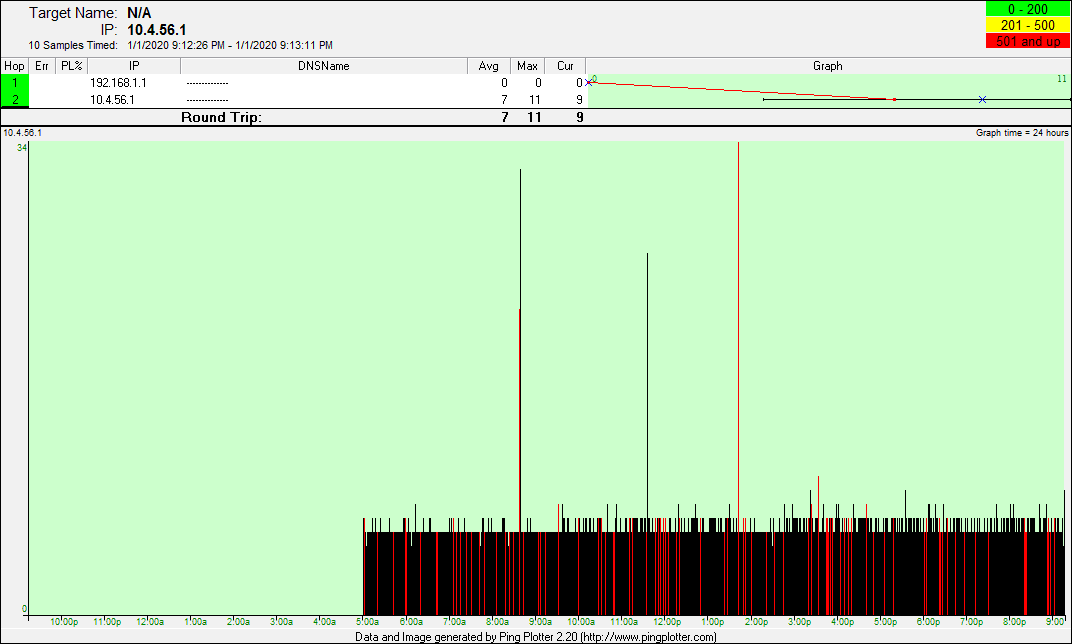
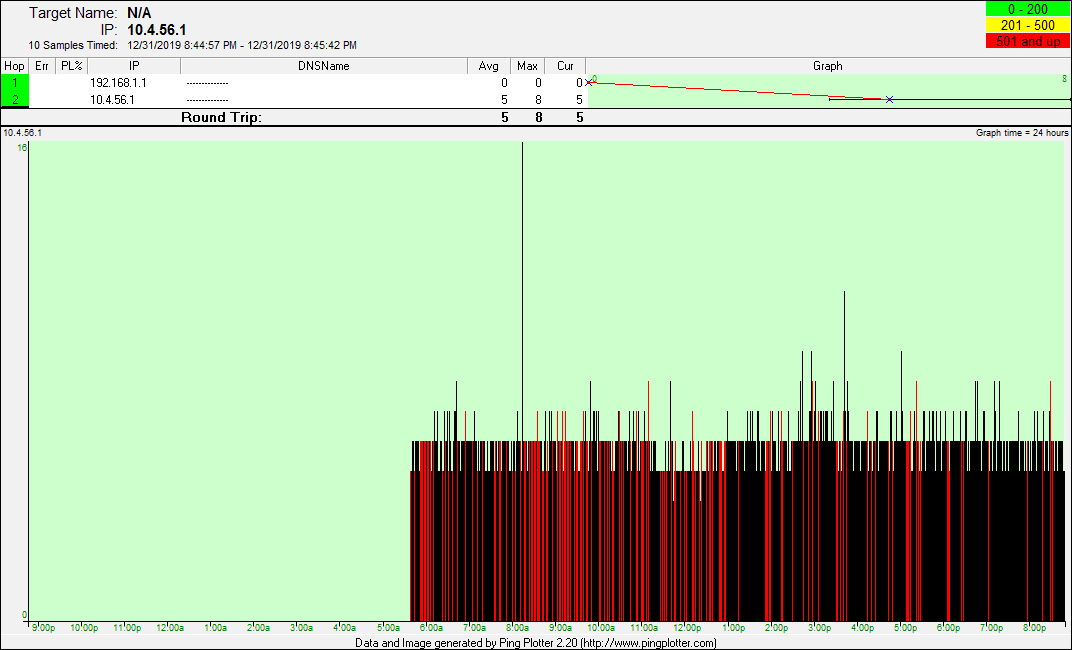
pingplotter screenshots below the notes are sequenced with the
most recent daily screenshot at the top and they descend by
date from there. The pingplotter screenshots represent good
connection time periods as BLACK and periods with packet loss
as RED. The horizontal axis at the bottom of the graphical
plot displays an incremental timeline with hourly timestamps.
During the RED periods the connection becomes unresponsive at
worst and sluggish at best. Internet activities that involve
streaming or gaming are not viable and the upload capabilities
drop to below 1 Mpbs with frequent stalling. Additionally, my
Cox landline exhibits voice dropouts making it difficult for
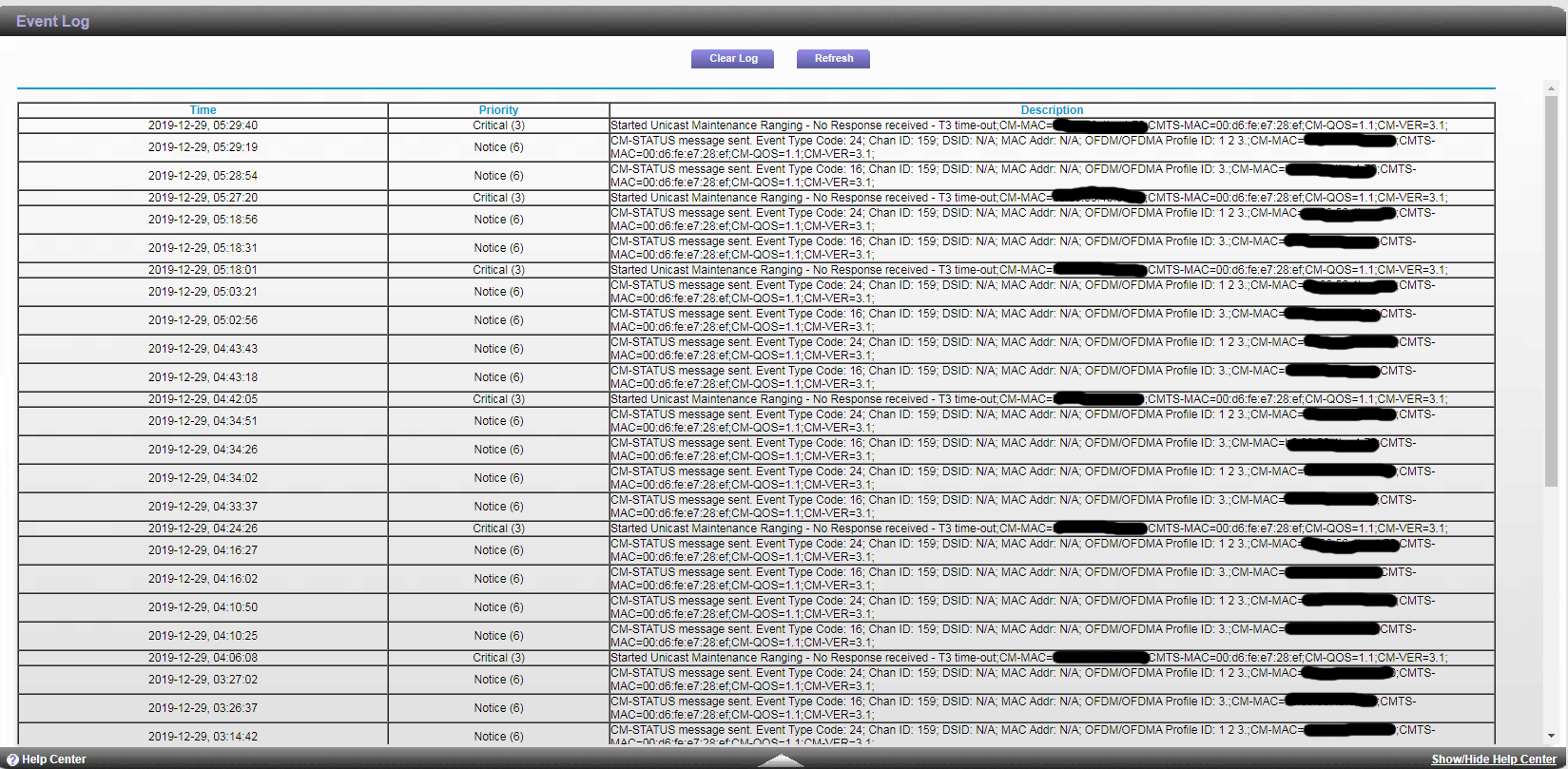
people to hear me when I am speaking. The cable modem exhibits
numerous T3 timeouts and accumulates a continuous stream of
Code 24 and Code 16 errors as the FEC profile fails to lock
because the connection is unable to run at its provisioned
speed.
Note that the Cox Field Technical Specialist (FTS), Michael, who worked on this node earlier in the year identified 3 separate ingress issues that affected service for everyone on the node. He eliminated two of them, but was unable to find the last one before Cox re-assigned him to another area. Although the ticket was marked resolved by Cox, this particular node-wide problem has been present intermittently throughout 2019 and has become very persistent since November.
-----------------------------------------------------------------------------<NOTES>-----------------------------------------------------------------------------
January 18, 2020 - Saturday: After a bit more than a week of clean performance, the packet loss and diminished upload speed has come back with a vengeance.
January 8, 2020 - Wednesday: There were several days between last Thursday and today where the node was worked on by Cox. The first thing they corrected was the download and upload speed problems. Both of them now reliably meet the internet tier that my modem is provisioned for. Additionally, they corrected the most serious issue with packet loss, leaving the connection much better but still sputtering with about 3% packet loss. Yesterday, the node was again worked on and the last issue with packet loss was successfully resolved at around 1:30pm. At this time, the connection is functioning very well, with no sign of packet loss or other anomalies.
January 2, 2020 - Thursday: I spoke with Cox technical support for an update on efforts to correct the issue and was informed that today my area would be experiencing periods of planned outages due to work on the node. When I placed the phone call to Cox there was a voice message indicating that my area was experiencing a temporary outage that was expected to be over by 4:23PM today. The representative suggested that I call back after 5PM as more information about the work done on the node would be available.
December 30, 2019 - Monday...scheduled non-residence tech visit: As promised, a Cox technician checked the connection at the street level today. I called Cox and spoke with a representative who reported that the Cox tech detected issues with the connection that would need intervention at the plant maintenance level. I was informed that the issue would be corrected within 48 hours.
------------------------------------------------------<CONNECTION HISTORY DOCUMENTATION>------------------------------------------------------
January 20, 2020 (Monday) Although the connection behaved fine on Sunday, the packet loss and diminished upload speeds are back again on Monday 1-20-2020. Note the Jitter and Upload as displayed with the Cox Speedtest on Monday 1-20-2020.

January 18, 2020 (Saturday) After good connection performance for more than a week, the connection is suffering again from packet loss and diminished upload speed.
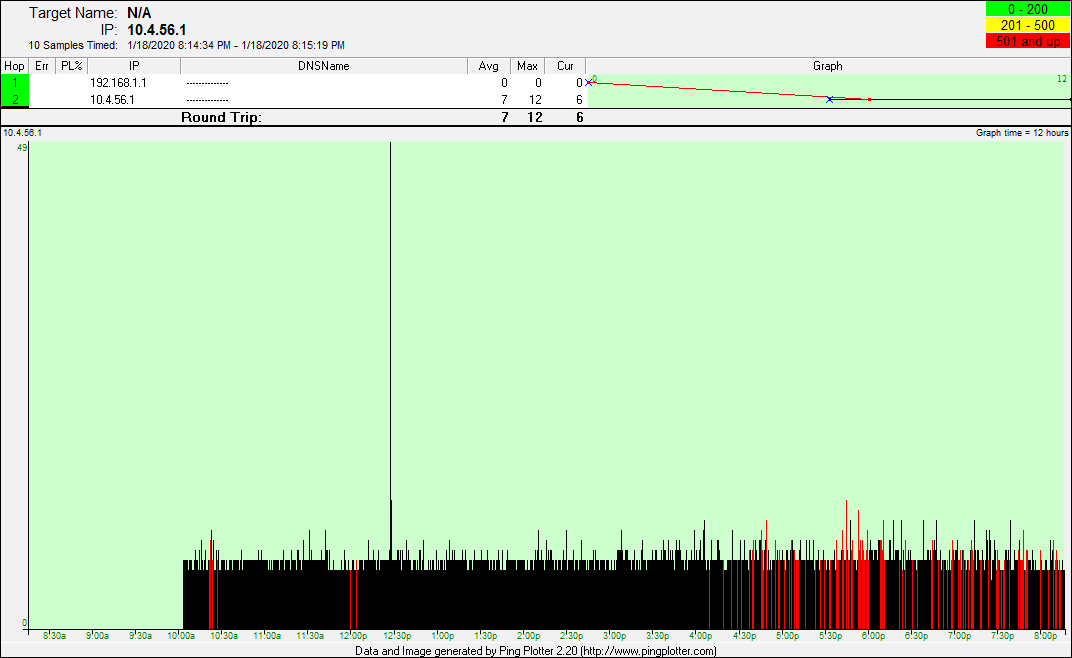
January 8, 2020 (Wednesday) After several more days of work on the node, the final issue with packet loss was resolved at roughly 1:30PM. The connection is now 100% at this time.

January 3, 2019 (Friday) After yesterday's work on the node the upload and download speeds are back to normal. No sustained periods of packet loss but intermittent issues still noted.
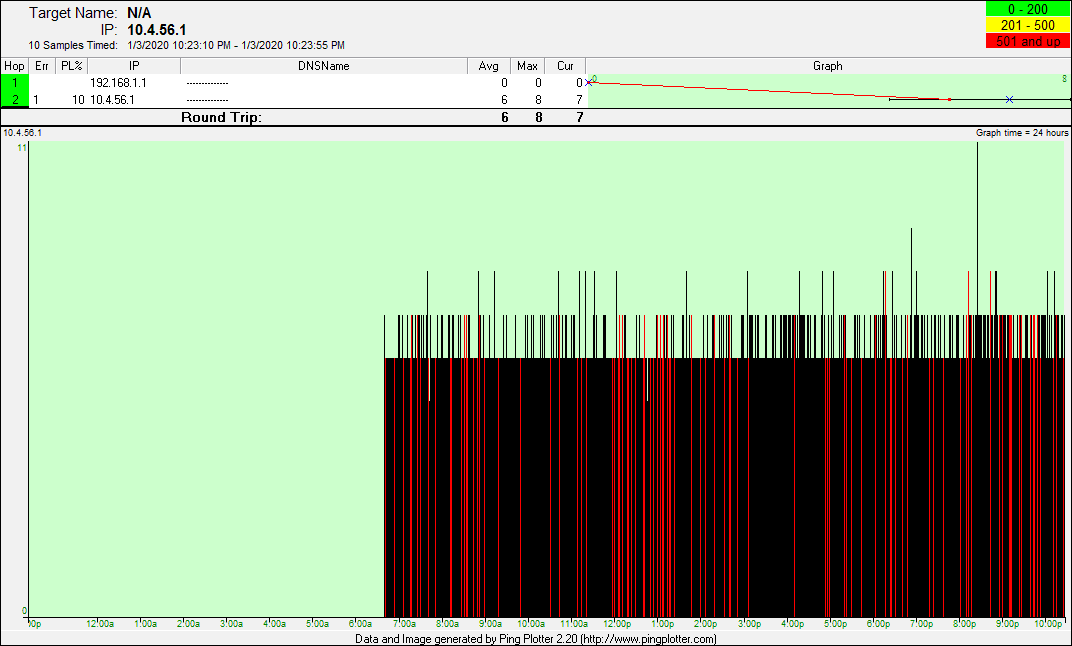
January 2, 2019 (Thursday) At times the connection is stalling and sluggish today. Oddly, the Cox speedtest indicates normal download and upload speeds. Intermittent packet loss noted.
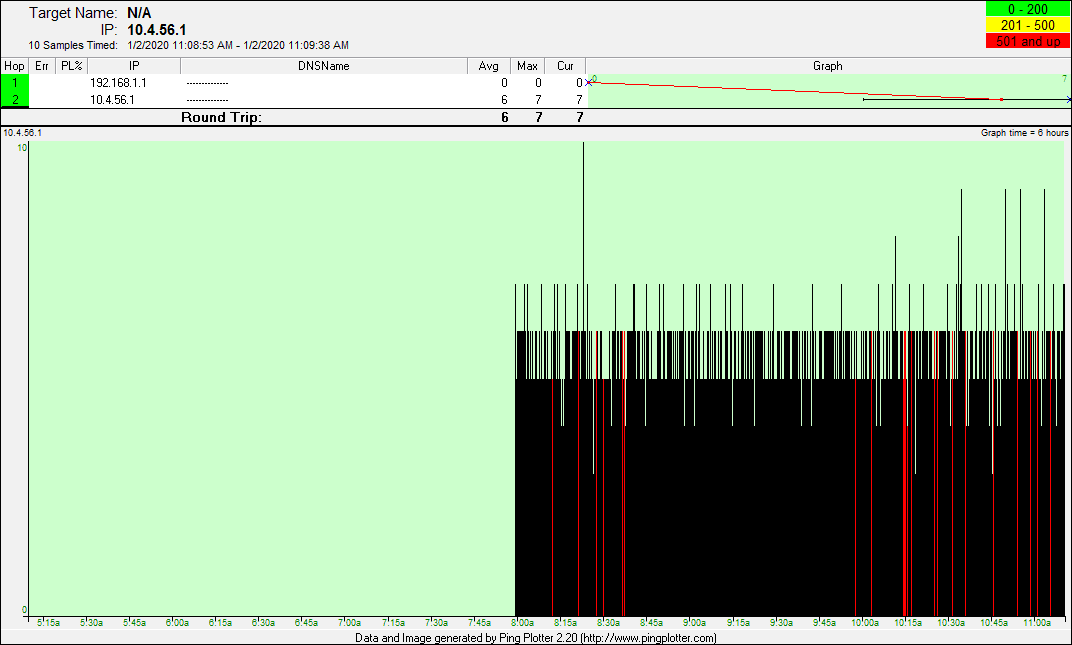
January 1, 2019 (Wednesday 5:00AM to 9:00PM - 16 hours) Intermittent packet loss with audio dropouts noted on the Cox landline phone.
December 31, 2019 (Tuesday 6:00AM to 9:00PM - 15 hours) Unresponsive and sluggish internet during heavy packet loss periods. Cox phone exhibits voice dropouts at times.
December 30, 2019 (Monday 6:30AM to 3:30PM - 9 hours) Unresponsive and sluggish internet during heavy packet loss periods. Cox phone exhibits voice dropouts at times.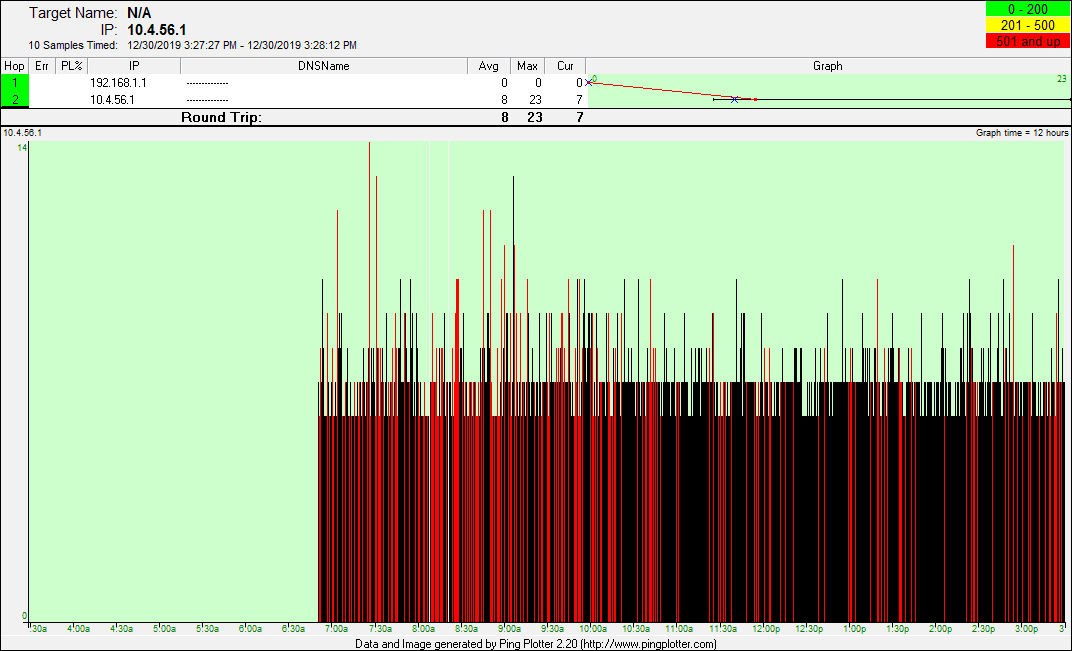
December 29, 2019 (Sunday 5:30AM to 9:30PM - 17 hours) Unresponsive and sluggish internet during heavy packet loss periods. Cox phone exhibits voice dropouts at times.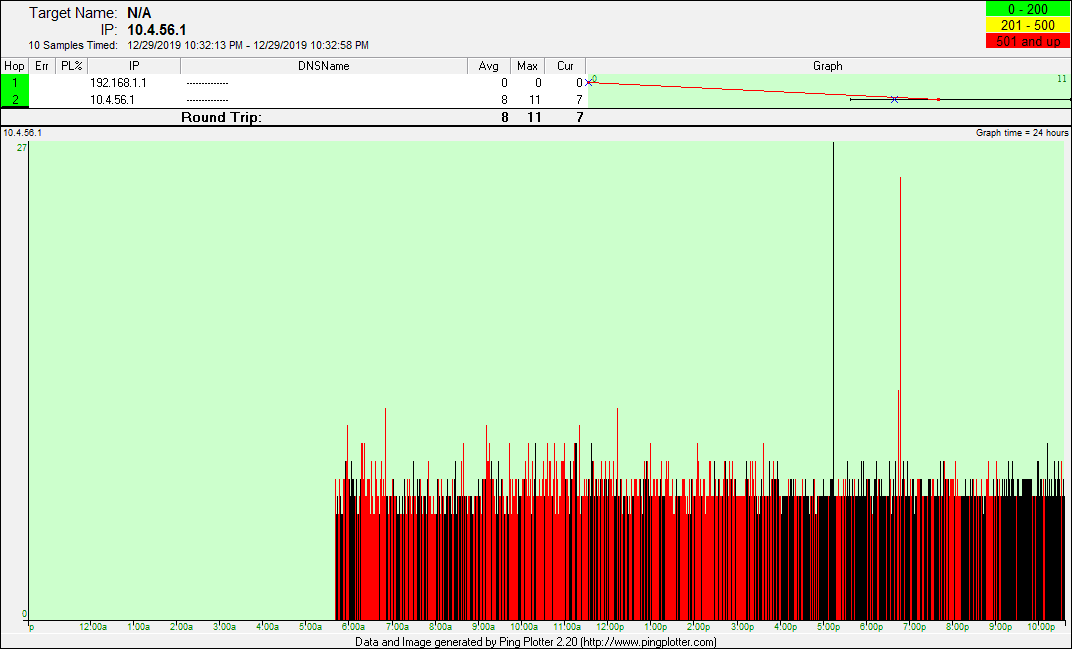
December 28, 2019 (Saturday 6:00AM to 10:00PM - 16 hours) Unresponsive and sluggish internet during heavy packet loss periods. Cox phone exhibits voice dropouts at times.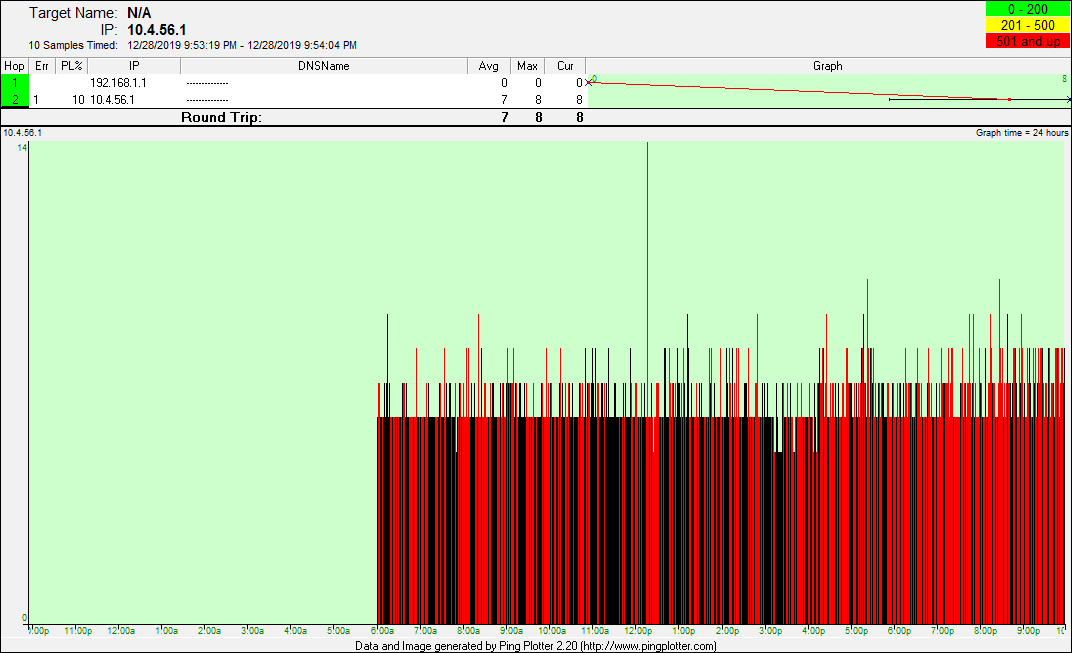
December 27, 2019 (Friday 7:00AM to 9:00PM - 12 hours) Unresponsive and sluggish internet during heavy packet loss periods. Cox phone exhibits voice dropouts at times.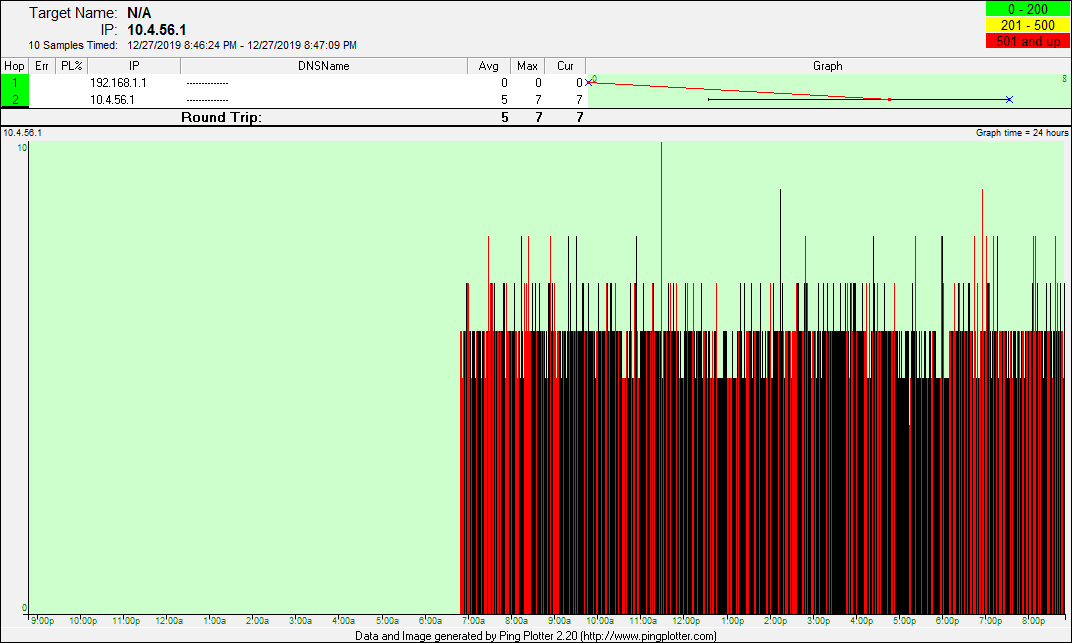
December 26, 2019 (Thursday 7:00AM to 10:00PM - 15 hours) Unresponsive and sluggish internet during heavy packet loss periods. Cox phone exhibits voice dropouts at times.
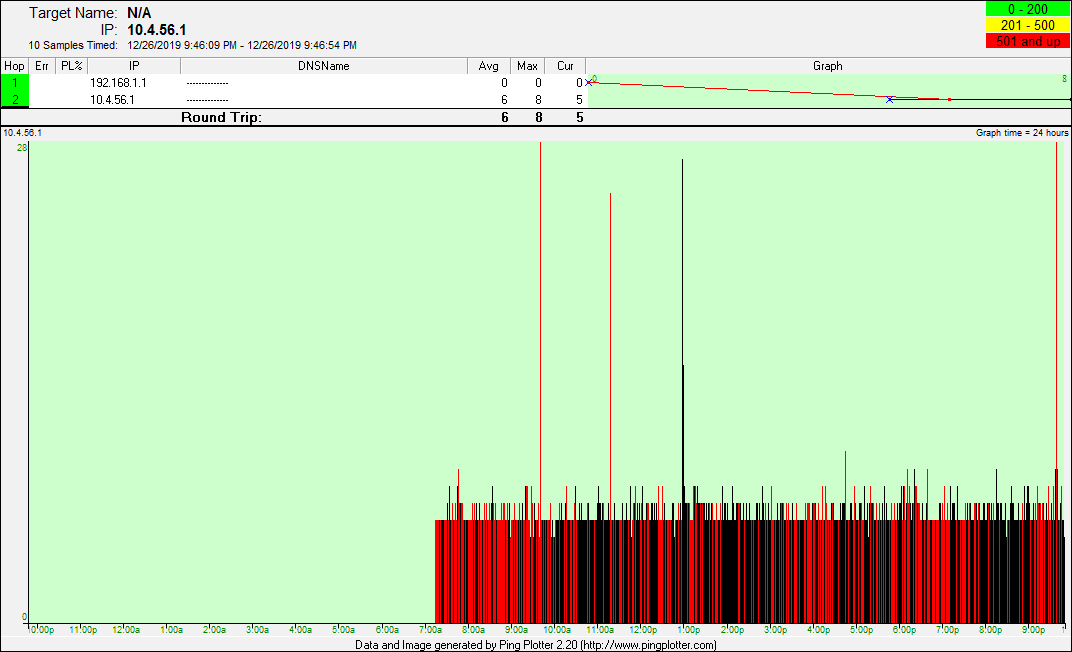
December 25, 2019 (Wednesday 6:30PM to 10:00PM - 3.5 hours) Unresponsive and sluggish internet during heavy packet loss periods. Cox phone exhibits voice dropouts at times.
Note that the Cox Field Technical Specialist (FTS), Michael, who worked on this node earlier in the year identified 3 separate ingress issues that affected service for everyone on the node. He eliminated two of them, but was unable to find the last one before Cox re-assigned him to another area. Although the ticket was marked resolved by Cox, this particular node-wide problem has been present intermittently throughout 2019 and has become very persistent since November.
-----------------------------------------------------------------------------<NOTES>-----------------------------------------------------------------------------
January 18, 2020 - Saturday: After a bit more than a week of clean performance, the packet loss and diminished upload speed has come back with a vengeance.
January 8, 2020 - Wednesday: There were several days between last Thursday and today where the node was worked on by Cox. The first thing they corrected was the download and upload speed problems. Both of them now reliably meet the internet tier that my modem is provisioned for. Additionally, they corrected the most serious issue with packet loss, leaving the connection much better but still sputtering with about 3% packet loss. Yesterday, the node was again worked on and the last issue with packet loss was successfully resolved at around 1:30pm. At this time, the connection is functioning very well, with no sign of packet loss or other anomalies.
January 2, 2020 - Thursday: I spoke with Cox technical support for an update on efforts to correct the issue and was informed that today my area would be experiencing periods of planned outages due to work on the node. When I placed the phone call to Cox there was a voice message indicating that my area was experiencing a temporary outage that was expected to be over by 4:23PM today. The representative suggested that I call back after 5PM as more information about the work done on the node would be available.
December 30, 2019 - Monday...scheduled non-residence tech visit: As promised, a Cox technician checked the connection at the street level today. I called Cox and spoke with a representative who reported that the Cox tech detected issues with the connection that would need intervention at the plant maintenance level. I was informed that the issue would be corrected within 48 hours.
------------------------------------------------------<CONNECTION HISTORY DOCUMENTATION>------------------------------------------------------
January 20, 2020 (Monday) Although the connection behaved fine on Sunday, the packet loss and diminished upload speeds are back again on Monday 1-20-2020. Note the Jitter and Upload as displayed with the Cox Speedtest on Monday 1-20-2020.
January 18, 2020 (Saturday) After good connection performance for more than a week, the connection is suffering again from packet loss and diminished upload speed.
January 8, 2020 (Wednesday) After several more days of work on the node, the final issue with packet loss was resolved at roughly 1:30PM. The connection is now 100% at this time.
January 3, 2019 (Friday) After yesterday's work on the node the upload and download speeds are back to normal. No sustained periods of packet loss but intermittent issues still noted.
January 2, 2019 (Thursday) At times the connection is stalling and sluggish today. Oddly, the Cox speedtest indicates normal download and upload speeds. Intermittent packet loss noted.
January 1, 2019 (Wednesday 5:00AM to 9:00PM - 16 hours) Intermittent packet loss with audio dropouts noted on the Cox landline phone.
December 31, 2019 (Tuesday 6:00AM to 9:00PM - 15 hours) Unresponsive and sluggish internet during heavy packet loss periods. Cox phone exhibits voice dropouts at times.
December 30, 2019 (Monday 6:30AM to 3:30PM - 9 hours) Unresponsive and sluggish internet during heavy packet loss periods. Cox phone exhibits voice dropouts at times.
December 29, 2019 (Sunday 5:30AM to 9:30PM - 17 hours) Unresponsive and sluggish internet during heavy packet loss periods. Cox phone exhibits voice dropouts at times.
December 28, 2019 (Saturday 6:00AM to 10:00PM - 16 hours) Unresponsive and sluggish internet during heavy packet loss periods. Cox phone exhibits voice dropouts at times.
December 27, 2019 (Friday 7:00AM to 9:00PM - 12 hours) Unresponsive and sluggish internet during heavy packet loss periods. Cox phone exhibits voice dropouts at times.
December 26, 2019 (Thursday 7:00AM to 10:00PM - 15 hours) Unresponsive and sluggish internet during heavy packet loss periods. Cox phone exhibits voice dropouts at times.
December 25, 2019 (Wednesday 6:30PM to 10:00PM - 3.5 hours) Unresponsive and sluggish internet during heavy packet loss periods. Cox phone exhibits voice dropouts at times.
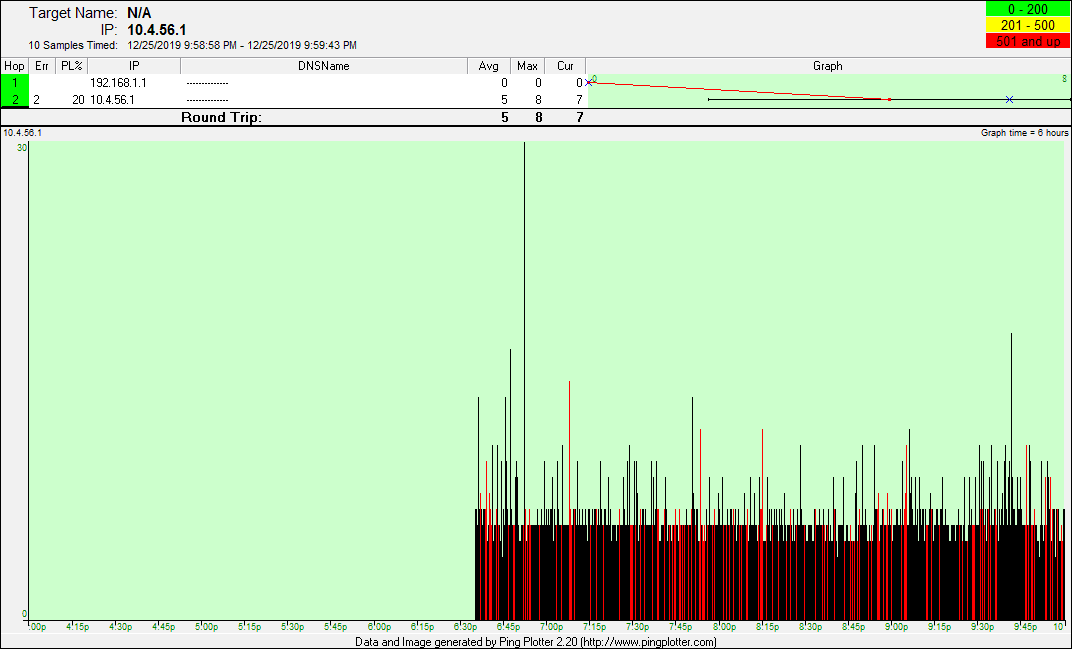
A screenshot from the CM1000 modem log on December 29, 2019: Continuous T3 timeouts and the OFDM channel is constantly failing FEC lock on one of the OFDM profiles. Event type code 16, is the loss of FEC lock for an OFDM profile. In this case the highest profile 3 is the one going impaired. Event type code 24 is FEC recovery on that profile.